
Order fulfillment doesn’t become efficient just because one task is automated. Automated order fulfillment system integration connects sales channels, inventory data, order management, and warehouse workflows, so orders pass through consistent checks and routing before they’re picked, packed, and shipped.
That connected approach matters because order processing involves more than receiving a purchase. It includes managing inventory, preparing the order, packaging it, and arranging shipment, with each step relying on accurate information from the one before it. When systems don’t share data, manual handoffs can interrupt the flow.
This guide explains how automated order processing works and how it connects ecommerce, business, and warehouse systems. You’ll learn how integration supports picking, packing, and shipping, and where warehouse automation fits into a broader fulfillment workflow.
Key Takeaways
- Trace how an order moves from sales channels through inventory and warehouse systems to identify where information handoffs affect fulfillment.
- Clarify how ecommerce, CRM, ERP, accounting, and shipping software share order data and support a consistent workflow.
- Explore how warehouse automation can coordinate picking, packing, and shipping as connected steps.
- Assess how integration, warehouse processes, and material handling equipment can work together to support fulfillment operations.
1. What Is Automated Order Processing?
An automated order fulfillment system connects order-management software, inventory records, and warehouse tools. It moves purchases through fulfillment by checking stock, routing picking tasks, and recording packing and shipping updates. For example, an ecommerce order can reserve inventory before warehouse staff retrieve the item.
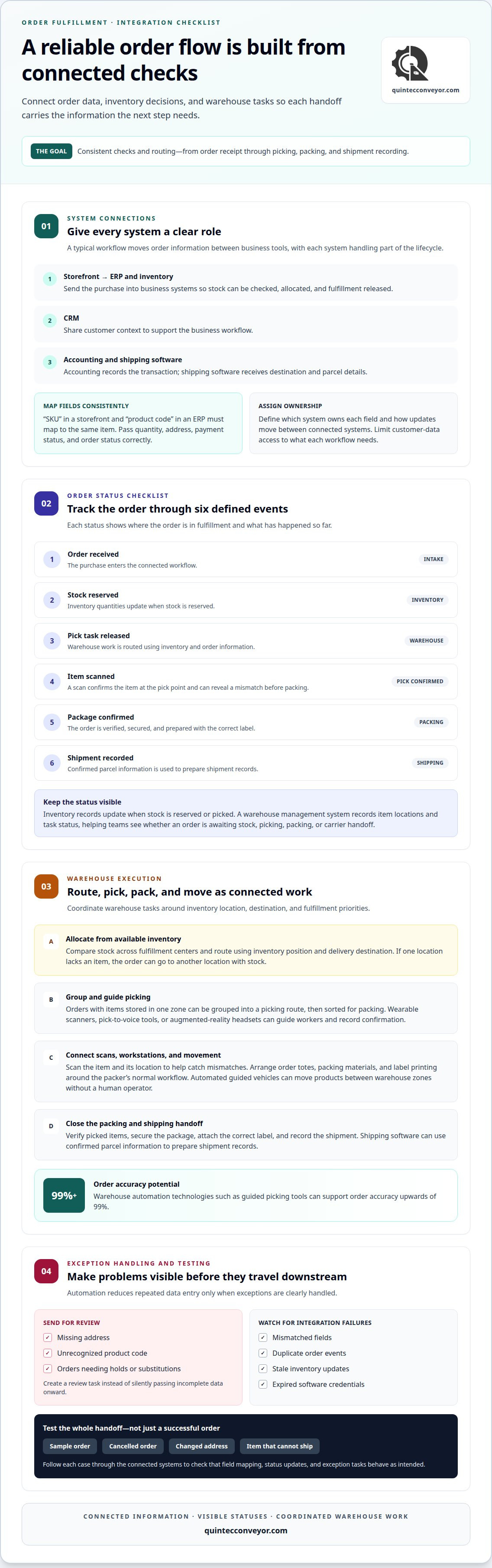
Order tracking follows a defined sequence: order received, stock reserved, pick task released, item scanned, package confirmed, and shipment recorded. An inventory system updates quantities when stock is reserved or picked, while a warehouse management system records item locations and task status. These events show whether an order is awaiting stock, picking, packing, or carrier handoff.
Order data can pass from ecommerce channels into inventory and ERP systems. A SKU, quantity, destination, and status need consistent meanings across connected tools. Automated systems can normalize orders from different sales channels. They can then apply the same inventory checks and routing logic. Connections to a 3PL’s technology may synchronize orders hourly or daily.
Multi-location inventory adds an allocation decision. The system compares available stock across fulfillment centers and can route orders based on inventory position and delivery destination. For example, if one location lacks an item, the order can go to another location with stock. A shared view of supplier data, inventory positions, and orders helps teams see beyond isolated warehouse balances.
AI can analyze demand patterns alongside inventory and order data. This analysis can inform replenishment priorities or highlight potential imbalances across locations. Staff need clear rules for exceptions, substitutions, and order holds. In B2B operations, complex routing, multiple facilities, and large order volumes make visibility especially useful. Accurate status updates also help customer satisfaction by giving service teams a dependable view of each fulfillment process.
2. Order processing system integration with ecommerce, CRM, ERP, accounting, and shipping software
Order processing connects software so ecommerce purchases move through defined business steps. A typical workflow sends an order from the storefront to the ERP, then shares customer context with the CRM. Accounting records the transaction, while shipping software receives destination and parcel details. Each system handles a different part of the order lifecycle.
Integration depends on consistent field mapping. A storefront might label an item “SKU,” while an ERP uses “product code.” The connection must map both fields to the same item and pass quantity, address, payment status, and order status correctly. During implementation, teams define which system owns each field and how updates move between systems.
In ecommerce order processing, an order can move from payment approval to inventory allocation, fulfillment release, shipment, and accounting reconciliation. Automated handoffs reduce repeated data entry, but only when systems handle exceptions clearly. A missing address or unrecognized product code should create a review task rather than silently sending incomplete data downstream.
For U.S. fulfillment, configure tax, shipping, privacy, and compliance handling for the jurisdictions and transaction types involved. The integration should pass the necessary order and shipment details while limiting access to customer data. This keeps information useful to each workflow without sharing every customer field across every system.
Common failures include mismatched fields, duplicate order events, stale inventory updates, and expired software credentials. A practical test follows sample orders through each connected system, including a cancelled order, a changed address, and an item that cannot ship. CDC guidance notes that removing sensitive fields from files can help minimize exposure to legal and compliance risks. Process engineering can help align software handoffs with physical workflows; explore process engineering support as integration planning extends into warehouse operations.
3. Streamlining picking, packing, and shipping
A connected warehouse workflow turns each released order into coordinated picking, packing, and shipping tasks. Order routing assigns work based on inventory location, destination, and fulfillment priorities. For example, orders with items stored in one zone can be grouped into a picking route, then sorted for packing. This reduces unnecessary movement between warehouse locations.
Automated order picking can use wearable scanners, pick-to-voice tools, or augmented-reality headsets. These tools guide workers to the next item and record confirmation at the pick point. Warehouse automation technologies such as these can support order accuracy upwards of 99%. Scanning the item and its location also helps identify a mismatch before packing begins.
Ergonomic picking and packing workstations should place frequently handled items within practical reach and keep the work sequence clear. A workstation can position order totes, packing materials, and label printing around the packer’s normal workflow. For example, scanning a picked item, confirming its order, and preparing its shipping label at one station limits repeated handling between separate work areas.
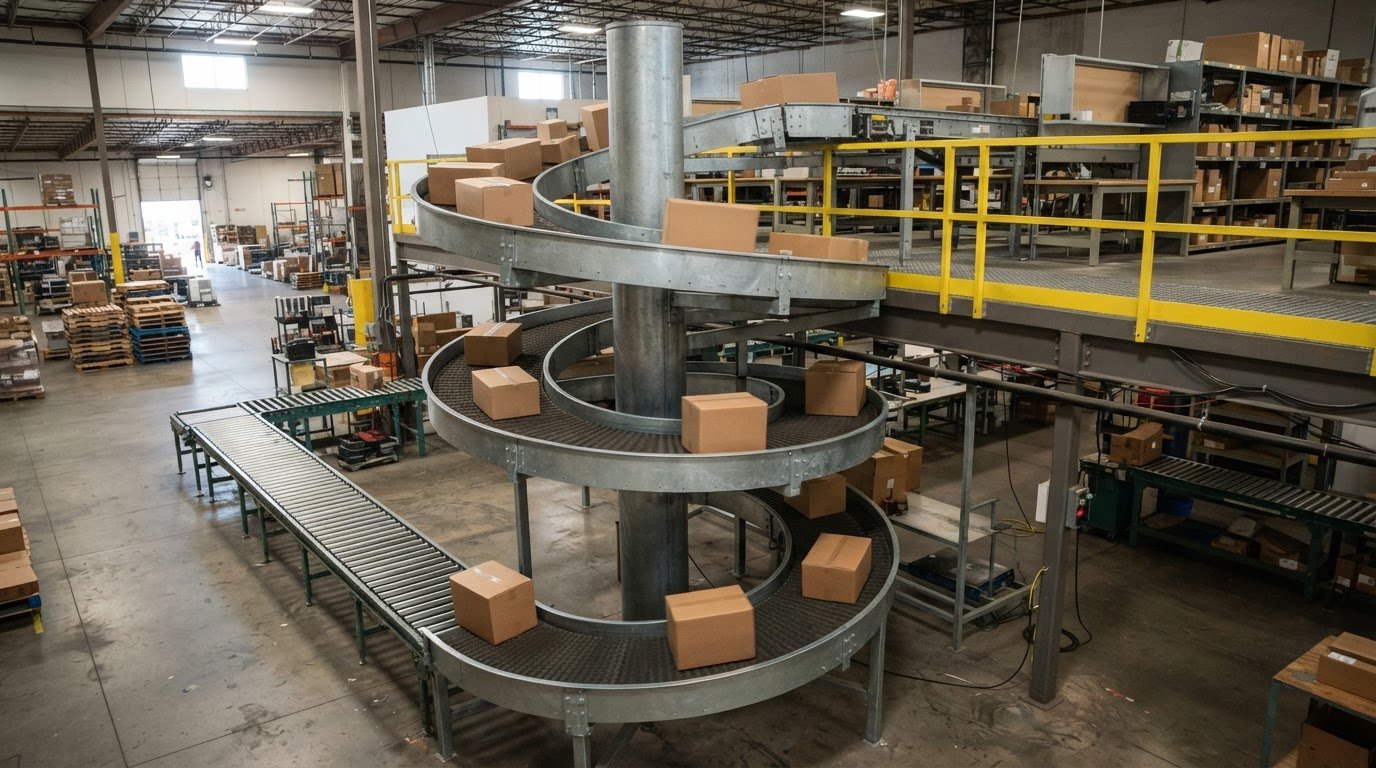
Automation can also move products between warehouse zones. Automated guided vehicles transport products around a facility without a human operator, linking picking areas with packing stations. A warehouse management system can release replenishment or movement tasks as order activity changes. Connecting task instructions with equipment helps streamline the process without treating every order as identical.
At packing, automated systems can process order details and packaging steps without manual intervention. Shipping software can then use confirmed parcel information to prepare shipment records. A clear sequence matters: verify the picked items, secure the package, attach the correct label, and record the shipment. For ecommerce operations with multiple sales channels or complex inventory, connected workflows help teams manage changing order volumes while keeping each handoff visible. Faster movement matters only when the right item reaches the right order.
4. Integration-led order fulfillment automation
Automation delivers more value when connected systems support one order fulfillment process. Order management software, warehouse tools, and shipping applications need shared status definitions. Otherwise, a platform may mark an order ready while warehouse staff still lack a pick task. Map each handoff, assign ownership for key data, and define how exceptions return to operations. Automated order fulfillment system integration should connect system events to clear actions, not simply move data between applications.
Order volume helps determine whether integration is worthwhile, but it isn’t the only factor. Ecommerce businesses processing hundreds of orders or more per month can use automation to speed shipping. Multiple sales channels, complex inventory, and frequent manual corrections also strengthen the case. Compare current order-handling work with the software, integration, labor, and warehouse hardware the proposed process requires.
Begin testing with representative orders, not just a successful standard purchase. Include an address change, a cancelled order, split inventory, and an unavailable item. Follow each event from the commerce platform through order management, warehouse tasks, and shipment records. Confirm that quantities, statuses, and customer details remain accurate at every handoff.
After launch, monitor exceptions, delayed status changes, duplicate records, and inventory mismatches. These signals can show whether an interface has stopped updating or a field mapping no longer matches. To troubleshoot, trace the affected order backward through its event history, identify the first incorrect or missing update, then correct the source before replaying the transaction. This approach protects accuracy and limits repeated manual entry.
Integration-led planning also clarifies which work belongs in software and which requires physical automation. A warehouse may need process engineering before adding equipment, especially when routing rules, storage locations, and picking paths interact. Dropshipping depends on supplier systems, while in-house automation may require warehouse management software, integration work, and hardware. Treat Automated order fulfillment system integration as an operational design decision, aligning digital workflows with the facility’s physical constraints. Plan an integrated automation workflow around your operations.
Quintec Conveyors
Quintec Conveyors can help translate fulfillment requirements into coordinated warehouse systems. When order volumes, routing rules, or facility workflows call for changes to material movement, its conveyors, robotics and automation, infrastructure, and additional material handling equipment can support an integrated approach. The right configuration depends on how orders move through the facility, where inventory is stored, and how picking and packing tasks connect.
Turn to Quintec Conveyors when software integration needs to align with physical warehouse operations or existing workflows need a more connected material handling design. A clear view of order movement and operational constraints helps shape practical system planning.
Contact Quintec Conveyors to discuss your fulfillment workflow.
Move Your Fulfillment Workflow Forward
Treat fulfillment as an evolving operating system, not a one-time software connection. As product mix, order patterns, and warehouse demands change, revisit how technology and physical workflows support one another. Improvement can start with a specific constraint, such as congestion between work areas or a handoff that still relies on repeated manual effort.
Use that operational priority to guide the next stage of Automated order fulfillment system integration. Align the intended process with the facility’s layout, equipment, and handling requirements before expanding automation. This keeps planning grounded in the work your team needs to complete and gives future system changes a clear purpose.
Quintec Conveyors can help assess material handling needs as your fulfillment operation evolves. Contact Quintec Conveyors to discuss a practical next step for your facility.
Frequently Asked Questions
What Is Automated Order Processing?
Automated order processing uses connected software and warehouse tools to manage order tasks with less manual handling. For example, a system can accept an online purchase, apply business rules, and create a warehouse task. Automation can also route unusual orders for review, such as a purchase with incomplete delivery details. The goal is coordinated processing, not removing human oversight from every decision.
How do I choose the right automated fulfillment provider?
Choose a provider whose capabilities match your facility’s physical workflow and automation goals. Consider whether the project involves a new facility, an expansion, or an upgrade, then define the warehouse constraints and equipment interfaces involved. When software plans must align with material movement, Quintec Conveyors’ process engineering and warehouse automation expertise can help shape an integrated facility approach.
Which systems and platforms can an order fulfillment system integrate with?
Common connections include ecommerce platforms, ERP and accounting software, CRM tools, inventory applications, warehouse management systems, and shipping software. A third-party logistics partner may also connect its technology to the merchant’s order workflow. Give each connection a defined purpose: the CRM, for instance, may need customer-service status, while warehouse tools need item and task details.
How do you integrate an automated fulfillment system with an ecommerce platform, ERP, and warehouse management system?
Start by documenting which application owns each business record, then establish data flows between ecommerce, ERP, and warehouse management. Configure the connection in a test environment and run representative transactions before activating live orders. During cutover, reconcile order statuses and inventory balances across systems. A staged rollout by channel or facility can isolate issues before wider deployment.
What data and APIs are needed for order fulfillment integration?
Integrations commonly exchange order identifiers, product codes, quantities, ship-to details, payment or release status, inventory availability, and shipment updates. APIs provide a structured way for software applications to request or send records. Define required fields, accepted formats, and event timing with each connected system. Restrict shared data to what the receiving application needs for its task.
How do leading fulfillment automation and integration platforms compare?
Compare platforms by how they handle order rules, inventory across facilities, exception workflows, and connections to existing business software. Assess whether the platform can also exchange useful status details with warehouse equipment and shipping tools. A platform with strong order management may not cover physical warehouse automation, so compare software capabilities separately from equipment and facility integration needs.